Does Moodle Have a Plagiarism Checker? (Turnitin & More)
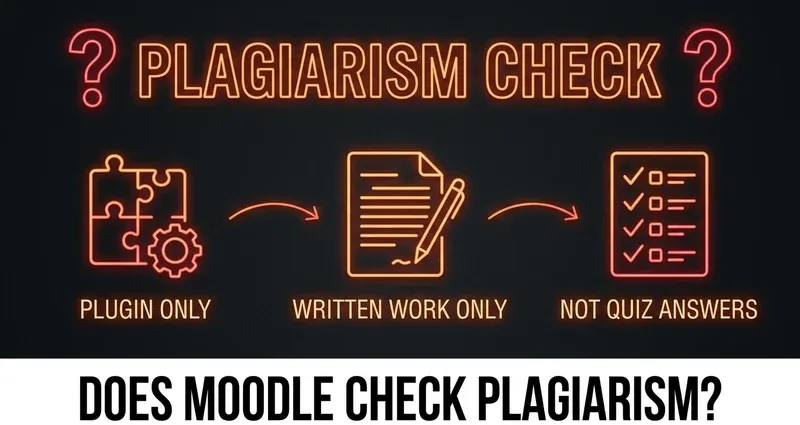
Does Moodle have a plagiarism checker? Core Moodle has none built in. It can only check for plagiarism if your school installs a plugin like Turnitin through Moodle's Plagiarism API — and even then, only on written submissions. Here's the full breakdown.

Does Moodle Have a Plagiarism Checker?
By itself, no. Core Moodle does not ship with a plagiarism checker. Out of the box, Moodle is a course platform: it stores your submissions, runs quizzes, records grades, and hands everything to your instructor. It does not compare your essay against the internet, it does not keep a database of student papers, and it has no idea whether two students wrote something similar.
So does Moodle check plagiarism? Only if your school deliberately adds the capability. The single way a Moodle site becomes a plagiarism checker is by installing a paid third-party plugin through Moodle's Plagiarism API — and the most common one by far is Turnitin. Below we will walk through what that API actually is, which tools schools bolt on, exactly what those tools scan, and why none of it applies to objective quiz answers.
Core Moodle Has the Plumbing, Not the Checker
This is the detail that confuses most students. Core Moodle does include something called the Plagiarism API — but the name oversells it. The Plagiarism API is described in Moodle's own developer docs as "a core set of functions that all Moodle code can use to send user submitted content to Plagiarism Prevention systems."
In plain English: the Plagiarism API is plumbing. It is the pipe that can carry your submission out to an external checker — but on its own it performs zero detection. On a stock Moodle install with no plagiarism plugin connected, your work is never scanned for anything. The pipe leads nowhere. Nothing happens.
That distinction matters because "Moodle has a Plagiarism API" gets misread as "Moodle has a plagiarism checker." It does not. The checker, if there is one, always lives in a separate paid product the school chose to install.
Where the Plagiarism Checker Actually Comes From: Plugins
A Moodle site only gains a plagiarism checker when an administrator installs and licenses a third-party plugin. The common ones in US higher ed are:
- Turnitin — by far the most widely used plagiarism checker for Moodle; integrates with assignments, forums, and workshops. Added an AI-writing indicator in April 2023.
- Copyleaks — an official Moodle partner since 2023; markets a single scan that checks for both plagiarism and AI-generated content.
- Compilatio — a similarity and AI checker, used heavily outside the US.
- Ouriginal / Urkund — legacy tools. Turnitin acquired Ouriginal and migrated those customers over, so you are far less likely to meet these as separate products today.
If your school has not installed one of these, there is simply nothing comparing your text against anything. Whether a submission gets checked at all is an institution-by-institution decision — it is never automatic, and it is never part of plain Moodle.
How Turnitin Works on Moodle (the One You'll Actually Meet)
Because Turnitin is the plagiarism checker for Moodle that most US students will encounter, it is worth being precise about what it does.
When a school connects Turnitin and you submit a written assignment, Turnitin compares your text against its huge database — the open web, published journals and books, and a repository of previously submitted student papers. It then produces a Similarity Report: a percentage estimate of how much of your document matches existing sources, with the matching passages highlighted so the instructor can see exactly what lined up and where.
A few things students rarely hear:
- The similarity score is not a verdict. A high percentage can come from properly quoted and cited material, a long reference list, or common phrasing. The number flags overlap; a human still has to decide whether anything is actually wrong.
- The report is instructor-only. On Moodle you typically do not see your own Similarity Report unless the instructor turns that option on.
- Since April 2023, Turnitin also shows an AI-writing indicator inside that same report — a separate estimate of how much of the document looks AI-generated.
For the full story on that AI piece, see our breakdown of whether Moodle detects AI or ChatGPT — it is a different question from plagiarism, even though both ride on the same Turnitin report.
The Accuracy Is Openly Disputed
Vendors advertise impressive numbers. Turnitin has cited around 98% confidence with a sub-1% false-positive rate for its AI detector; Copyleaks claims over 99% accuracy. Treat those as vendor marketing, not established fact.
Independent testing has repeatedly found these figures optimistic, and real false positives exist — there are documented cases of fully human-written text being flagged as AI, and one user reported ChatGPT-written text scoring as 100% human on a Copyleaks check. Similarity scores have their own quirks too: properly cited quotations and standard technical phrasing routinely inflate the percentage without any wrongdoing.
This is exactly why careful instructors treat these scores as a starting point for a conversation, not as automatic proof. Turnitin itself states its AI indicator "does not make a determination of misconduct" and should not be the sole basis for an academic-integrity case. A plagiarism checker for Moodle is a signal — a contested one — not a judge.
The Key Point: Quiz Answers Have Nothing to Scan
Here is the takeaway that matters most for getting work done on Moodle: a plagiarism checker analyzes prose. It has no role in objective quiz questions.
Turnitin, Copyleaks, and every similar tool work by comparing written sentences — the wording, structure, and phrasing of an essay, report, or long-answer response — against a database. That only functions when there is writing to compare.
Now look at what objective quiz questions actually are:
- Multiple choice — you pick option B. There is no sentence to match.
- True/false — you select one of two values.
- Matching — you pair items from two columns.
- Numerical — you type a number, like
42or3.14.
None of those produce prose. A correct multiple-choice answer is identical for every student who gets it right — that is the whole point of the question. There is no "writing style," no original phrasing, nothing for a similarity engine to compare against a database. Plagiarism checkers simply do not apply to objective quiz answers, because there is no text there to check.
That is the lane DodoSolve operates in. DodoSolve surfaces the answer to objective Moodle quiz and assignment questions, right on the page. It does not write essays, so there is no prose for Turnitin or any plagiarism plugin to scan in the first place. For the work most students need to move through faster — quizzes, homework, unit checks — plagiarism detection is not part of the equation at all.
What Moodle Can and Can't Check, at a Glance
- Core Moodle: no plagiarism checker — period. It only includes a Plagiarism API, which is an inactive pipe until a plugin is connected.
- With a plugin (Turnitin/Copyleaks/Compilatio): can check written submissions for similarity, and in Turnitin's case AI writing too — instructor-only, with disputed accuracy.
- On written work only: essays, reports, typed long-answer responses, file uploads.
- On quiz answers: plagiarism checking does not apply — multiple choice, true/false, matching, and numerical answers have no prose to scan.
- The DodoSolve extension: runs locally in your browser, never touches Moodle's servers, answers objective questions on the page, and leaves no trace for any plugin to scan.
A quick honesty note on limits: DodoSolve works on normal, non-proctored Moodle quizzes. If your school forces an exam into Safe Exam Browser or Respondus LockDown Browser, a Chrome extension cannot run inside those locked-down browsers — that is a hard limit, and we would never tell you otherwise. For the bigger picture on monitoring, see our guide on whether Moodle can detect cheating.
Answer quizzes with no plagiarism checker in the way
DodoSolve solves objective Moodle questions — multiple choice, true/false, matching, numerical, short answer — directly on the page. No essays, no written prose, nothing for Turnitin or any plagiarism plugin to flag.
The Bottom Line
Does Moodle have a plagiarism checker? Not on its own — core Moodle ships with no checker, just an inactive Plagiarism API that does nothing until a school connects a tool to it. Plagiarism checking on Moodle exists only when your institution installs and pays for a plugin like Turnitin or Copyleaks, it runs only on written submissions, the results are instructor-only, and the accuracy is openly disputed. None of it touches objective quiz answers — because a multiple-choice selection has no prose to scan. That is exactly the work DodoSolve is built for.
Frequently Asked Questions
Does Moodle have a built-in plagiarism checker?
No. Core Moodle has no plagiarism checker. It includes a Plagiarism API — a set of functions that can send submissions to an external checker — but the API performs no detection on its own. A Moodle site only checks plagiarism if the school installs a paid third-party plugin like Turnitin or Copyleaks.
Does Moodle use Turnitin?
Only if your school connects it. Turnitin is the most common plagiarism checker for Moodle, integrated through Moodle's Plagiarism API, but it is a separate licensed product — not part of core Moodle. If your institution has not installed it, your work is not run through Turnitin.
Does Moodle check plagiarism on quiz answers?
No. Plagiarism checkers analyze written prose — essays, reports, typed long answers. Objective quiz questions like multiple choice, true/false, matching, and numerical answers contain no prose to compare, so similarity checking does not apply to them.
Is Moodle's plagiarism checker accurate?
When a plugin is installed, accuracy is openly disputed. Vendors advertise very high numbers, but independent testing has found those figures optimistic, with documented false positives on human-written work. Turnitin itself says its results don't prove misconduct and shouldn't be the sole basis for action.
Does DodoSolve trigger a plagiarism checker on Moodle?
No. DodoSolve answers objective quiz questions on the page — it does not generate essays or written prose, so there is nothing for a plagiarism plugin to scan. It also runs locally in your browser and never communicates with Moodle's servers.